Keep times and private notes in check, approve guest photos and messages, and send updates to the guest page or big screen. The toastmaster gets a private link so hosts can share the job.
The toastmaster is practical help during the party: keep the programme moving, introduce speeches, coordinate with the venue and kitchen, and handle last-minute changes. Align with the hosts beforehand.
Once the party is running, fest-appen helps with the overview: run sheet, notes and approvals in one place on the phone.
Food is late, or a speech swaps place. The toastmaster can send a short message so guests can see the change on the guest page or screen.
When pre-approval is on, the toastmaster can review new photos and messages from the phone before they appear.
Share the run sheet and notes with the others who help, instead of several group chats.
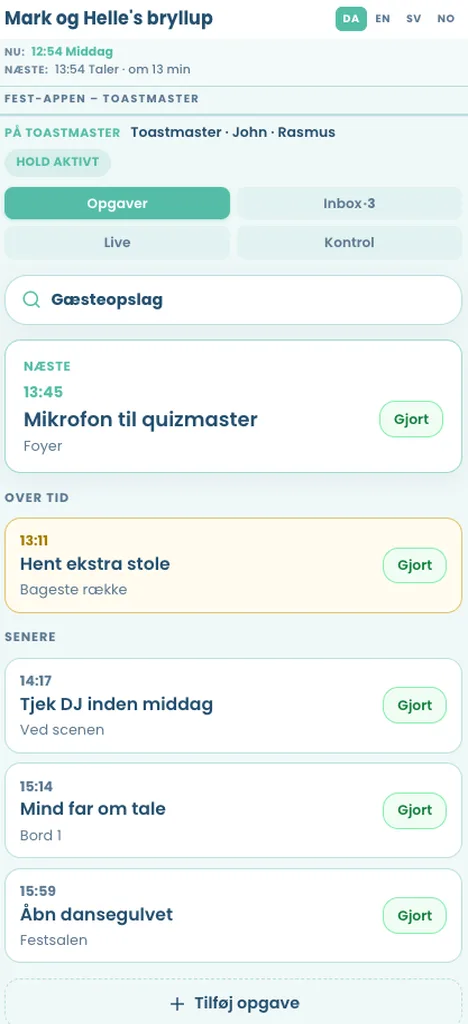
The toastmaster gets a private link for the evening. No admin login. Hosts set that up in admin and can share the job during the party.
Usually: keep the programme moving, introduce speeches, coordinate with the venue and kitchen, and handle last-minute changes. You are the hosts' practical help during the party.
A private phone link with the run sheet and notes, guest uploads to approve, messages to the guest page or big screen, and shared notes if several people help. Guests still use the same guest page via QR.
No. They get a private link for the evening. Hosts set that up in admin.
No. The screen is optional. Approvals and the run sheet still help without a projector.
The live demo is the guest page and TV slideshow. Toastmaster tools are shown as screenshots on the demo page. Get a trial page if you want the private link on your own event.
Fill in the form and we create your guest page. You get login by email, typically the same weekday (weekend: next business day), and a free 30-day trial with limited test content. No commitment until you order and pay. When you pay, you continue on the same guest page with the setup you already made.